
Construction Scheduling Without the Primavera Price Tag
Asta Powerproject gives your planners P6-level construction scheduling that the whole team can read and use.
- Imports your existing P6 and MSP files. Nothing gets rebuilt
- Runs alongside Primavera. No rip-and-replace
- Planners productive in days, not weeks
From Projects Analytics: 30+ years implementing and teaching construction scheduling software.
Start your free trial
No credit card required. Our team sets you up with a guided first look.
"*" indicates required fields
A Schedule Your Whole Team Can Read
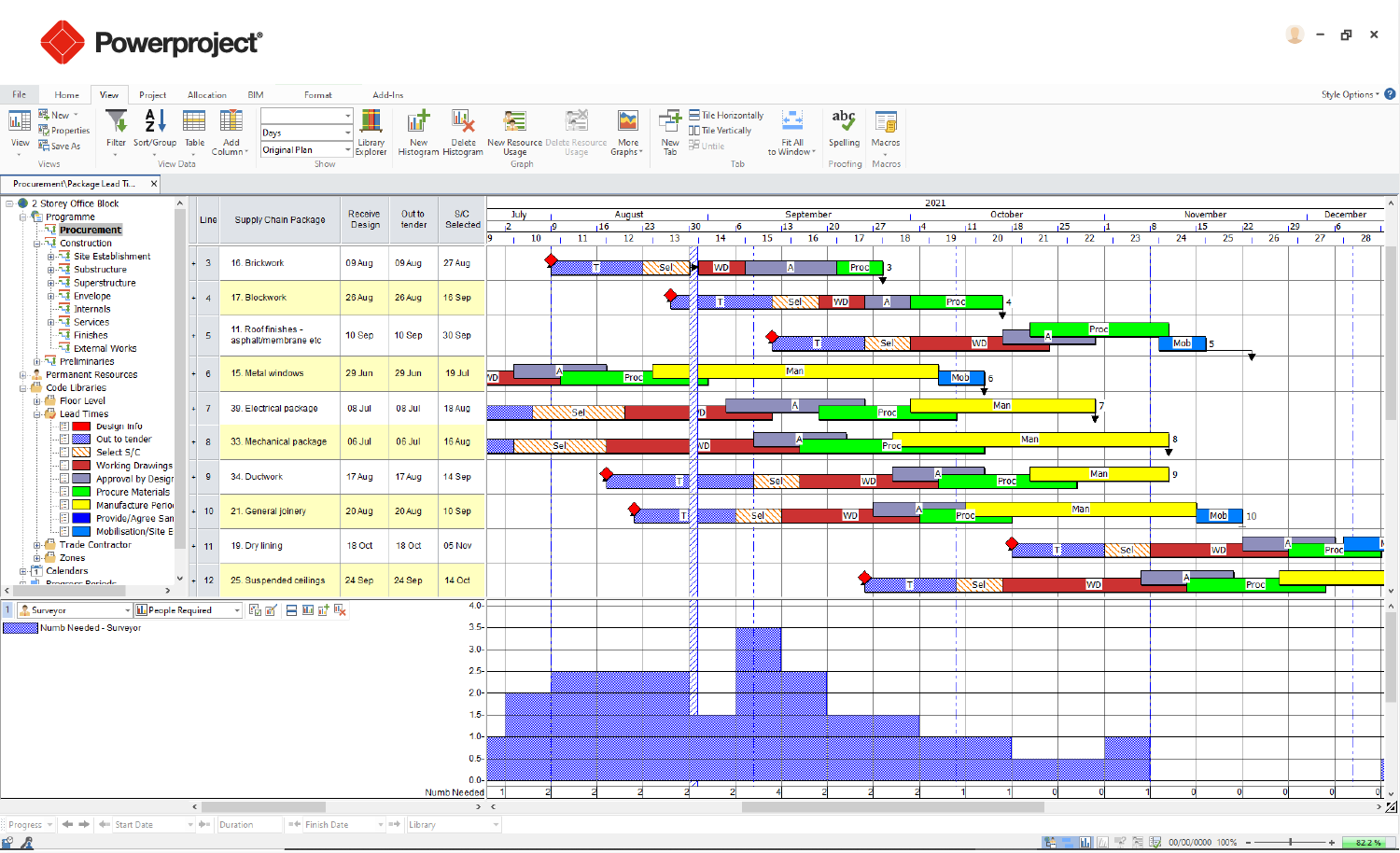
Asta Powerproject: construction Gantt planning with resource loading, built for construction sequencing.
What Construction Teams Say
“30 staffers might be required for a job usually but, if we’re late because of someone else, it may take 49 people. Asta Powerproject acts as our early warning sign.”
George Kettlewell, Director of Project Resources, Encore Electric
“Since the fall of 2011, FMC Technologies has relied on Project Analytics for exemplary training and support of our employees.”
Jack Gutweiler, Project Planning Supervisor, FMC Technologies Inc.
“Your training sessions have been a great help, very clear instruction of the workings of P6 and your support over the past month has been exceptional and very timely, often within the hour.”
John Soares, Project Manager, Forcum/Mackey Construction, Inc.
The Real Cost of Primavera-Only Scheduling
Your planners are paying enterprise prices for a tool half the team barely uses to its full potential. Primavera P6 seats are expensive, onboarding a new scheduler takes weeks, and every time you bring on a junior planner you’re stuck choosing between a steep learning curve or handing them Microsoft Project and hoping the schedule holds together.
Meanwhile, the schedule itself is supposed to be a communication tool – something a superintendent, an owner’s rep, or a PM can glance at and understand. Instead it lives inside software only your most senior scheduler can drive, which means the rest of the team is working off summaries instead of the real plan.
And if you’ve ever floated the idea of switching tools, the answer from your scheduling team is usually the same: “We’d have to rebuild everything from scratch.” That fear alone keeps a lot of GCs locked into a tool that costs more than it needs to.
How the Asta Powerproject Free Trial Works
- Import your existing schedules. Bring in P6 and MSP files directly – your historical schedules and current projects don’t get left behind.
- Build and run schedules in Asta Powerproject. Full Gantt-based planning built specifically for construction sequencing, not adapted from generic project management software.
- Run it alongside Primavera. No forced rip-and-replace. Teams can use Asta Powerproject for day-to-day planning while Primavera stays in place wherever it’s still required.
- Get planners productive in days, not weeks. The interface is built to be approachable, so new schedulers and PMs can read and update schedules without months of training.
Why Construction Teams Choose Asta Powerproject
Lower your per-seat software cost Compared to Primavera P6, without giving up construction scheduling power.
Cut new-planner ramp-up time From weeks to days with a more intuitive Gantt interface.
Keep every historical schedule Import directly from P6 and MSP. No rebuilding from zero.
Give the whole team a schedule they can read Not just the scheduler who built it.
Run in parallel with Primavera The switch doesn’t force a disruptive all-at-once migration.
Standardize scheduling practices Across a team where planner skill level and tool experience vary project to project.
Why Asta Powerproject (vs. staying Primavera/MSP-only)
Sticking with Primavera P6 alone means paying enterprise per-seat pricing for every planner on staff, plus the ongoing cost of training anyone who isn’t already fluent in it. Sticking with Microsoft Project alone means working around a tool that wasn’t built for construction sequencing in the first place – it takes workarounds to do what a construction scheduling tool should do natively.
Asta Powerproject sits in the gap: built specifically for construction planning, priced to make sense for a full team (not just your senior schedulers), and able to read the P6 and MSP files you already have. You’re not asking your team to choose between capability and cost – and you’re not asking them to start over.
Asta Powerproject FAQ
We already have Primavera P6 licenses. Why would we add another tool?
You don’t have to replace P6 – Asta Powerproject runs alongside it. Many GCs use Asta Powerproject for day-to-day planning and broader team access, while keeping Primavera wherever contract requirements or client mandates call for it.
Will we lose our existing schedules if we switch tools?
No. Asta Powerproject imports P6 and Microsoft Project files directly, so your current and historical schedules carry over instead of getting rebuilt from scratch.
How long does it take a planner to get productive in Asta Powerproject?
Planners are typically productive within days, not the weeks it often takes to onboard someone fully onto Primavera P6.
Is Asta Powerproject really cheaper than Primavera?
Yes. Asta Powerproject is priced to be a fraction of the per-seat cost of Primavera P6. Exact pricing depends on how many planners you are licensing and the configuration your team needs, so we walk through current numbers during your free-trial setup call. You see the pricing before you commit to anything.
What happened to the Enterprise edition?
Enterprise edition has been discontinued. Current licensing is built around the standard Asta Powerproject product line, and during your trial we point you to the configuration that fits how your team schedules today.
See what your planners can do
See what your planners can do with a scheduling tool built for construction, not adapted for it. Start a free trial of Asta Powerproject and bring your existing P6 or MSP schedules in from day one.
Already licensed and ready to buy? Purchase Asta Powerproject licenses.