
Oracle Primavera Cloud
Solutions
Why Choose Oracle Primavera Cloud for Your Construction Business?
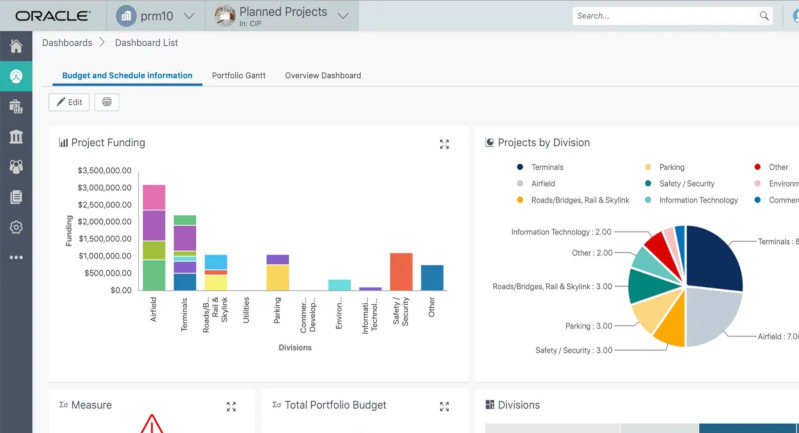

Oracle Primavera Cloud (OPC) is a comprehensive project management solution that addresses key pain points for large, complex engineering and construction projects. It moves project execution away from fragmented tools toward a single, cloud-based platform for better coordination and visibility.
Portfolio Management & Capital Planning
Allows executives to manage a pipeline of projects, evaluate scenarios for optimal selection, allocate budgets, and track performance against strategic goals.
Schedule Management
Offers robust Critical Path Method (CPM) scheduling with interactive Gantt charts and activity network view to manage milestones, dependencies, and timelines effectively.
Lean Task Management
Integrates with the Last Planner System, providing digital planning boards (Work Plan view) for field teams to coordinate short-term tasks, track commitments, and synchronize with the master schedule.
Collaboration and Mobile Access
Facilitates real-time communications and progress updates through built-in discussion tools and dedicated mobile applications for both office and field teams, supporting offline functionality.
Integration
Runs on Oracle Cloud Infrastructure and can integrate with other applications, including Primavera P6, via API or XER/XML file import/export for seamless data exchange.
Key Features of Oracle Primavera Cloud
Project Planning & Scheduling
- Create project breakdown structures (PBS) and define tasks and milestones.
- Build CPM (Critical Path Method) schedules.
- Compare schedule baselines and analyze delays.
- Track task completion percentages and project progress.
✔ Helps project managers plan complex timelines with thousands of activities.
Risk Management
- Maintain a risk register for identifying and tracking risks.
- Perform quantitative risk analysis (such as Monte Carlo simulations).
- Analyze how risks affect cost and schedule.
✔ Helps organizations predict problems before they impact the project.
Budget & Cost Management
- Create cost breakdown structures (CBS).
- Track budgets, expenses, and cash flow.
- Forecast future project costs.
✔ Keeps projects within budget and improves financial planning.
Dashboards & Reporting
- Visual dashboards with graphs and analytics.
- Generate reports on schedule health, costs, and risks.
- Compare project performance across portfolios.
✔ Provides real-time insights for faster decision-making.
Resource Management
- Allocate labor, equipment, and materials across projects.
- View resource utilization charts and histograms.
- Identify resource shortages or over-allocation.
✔ Ensures resources are used efficiently across multiple projects.
Portfolio & Program Management
- View all projects in a single portfolio dashboard.
- Prioritize projects based on budget, strategy, and risk.
- Track capital spending and performance across programs.
✔ Helps executives manage multiple projects simultaneously.
Collaboration & Task Management
- Break schedule activities into daily or weekly tasks.
- Teams can update progress in real time.
- Cloud access allows teams to work from anywhere.
✔ Improves coordination between contractors, managers, and stakeholders.
Benefits of Oracle Primavera Cloud
Better Project Visibility
Managers can monitor progress, risks, and costs in one system, improving decision-making.
Improved Collaboration
Teams across offices and construction sites can work together on the same platform.
Reduced Project Risks
Built-in risk analysis tools help prevent delays and cost overruns.
Efficient Resource Utilization
Organizations can optimize the use of staff, materials, and equipment across projects.
Cloud Accessibility
Since it’s cloud-based, users can access projects from any device with internet.
Better Strategic Planning
Portfolio management tools help align projects with business goals and budgets.
Key Differences Between Oracle P6 and Oracle Primavera Cloud
Primavera P6
Primavera Cloud
Administrator name
Service Administrator
Application Administrator
Project organization
Used EPS to organize projects.
Use workspaces to organize projects in a hierarchy.
Data
Most enterprise-wide configuration data was global and accessible to all projects.
Enterprise data is referred to as dictionaries. Dictionaries are created at the workspace level, and then shared to child workspaces.
Security
Managed via global security profiles.
Typically managed by assigning users to user groups with specific permission sets at the appropriate workspace level.
Data organization
Use Layouts to filter, group, and sort information.
Use Views to filter, group, and sort information.
Request a Free Consultation
"*" indicates required fields